DarkAuth Mini: Clone, Compose Up, Log In
I have a fairly stubborn opinion about what cloning a project should feel like. You clone the repo, you run docker compose up, and the whole thing is in front of you working. No shared .env file passed around in a chat, no “ask so-and-so for the staging credentials”, no signing up to three external services before the app will even boot.
Most of a stack can already live up to that. Postgres runs in a container. A message queue runs in a container. Your own services build from the same compose file. The bit that keeps breaking the promise is authentication.
The moment a project authenticates through OAuth/OIDC, a fresh clone can’t just log in. You need an identity provider to point at, and that means either standing up a full instance of one locally, or pointing at a shared hosted one and handing everybody client IDs, secrets and test accounts. Both options drag you back to passing configuration around and depending on something outside the repo. OAuth shouldn’t be an exception to “clone and run”, but in practice it usually is.
DarkAuth Mini is what I built to cover that.
A companion, not a dependency
DarkAuth is my zero-knowledge OAuth/OIDC server. It’s the thing you’d actually run in production. DarkAuth Mini is not that. It’s a tiny companion app you add alongside your own project, purely for local development, so that instead of needing a real account or a full DarkAuth instance running, you can debug and develop against something that behaves like one.
You add it as a service in your compose file, it comes up with everything else, and your app talks to it exactly as it would talk to the real DarkAuth: OIDC discovery, a JWKS endpoint, an authorize endpoint, a token endpoint, PKCE, refresh tokens. Your app’s authentication code doesn’t know or care that it’s talking to the Mini. It validates a signed token against a JWKS the same way it always would.
The difference is what happens at the login screen. There are no passwords. You pick who you want to be and you’re in.
Picking an identity
When your app redirects to the Mini’s authorize endpoint, you don’t get a login form asking for credentials you don’t have. You get a list of the demo users you configured, grouped by organisation. You click one, and you’re logged into your app as that user.
It follows your system light/dark preference automatically, with a toggle if you want to override it. Below is the same screen in dark and in light:
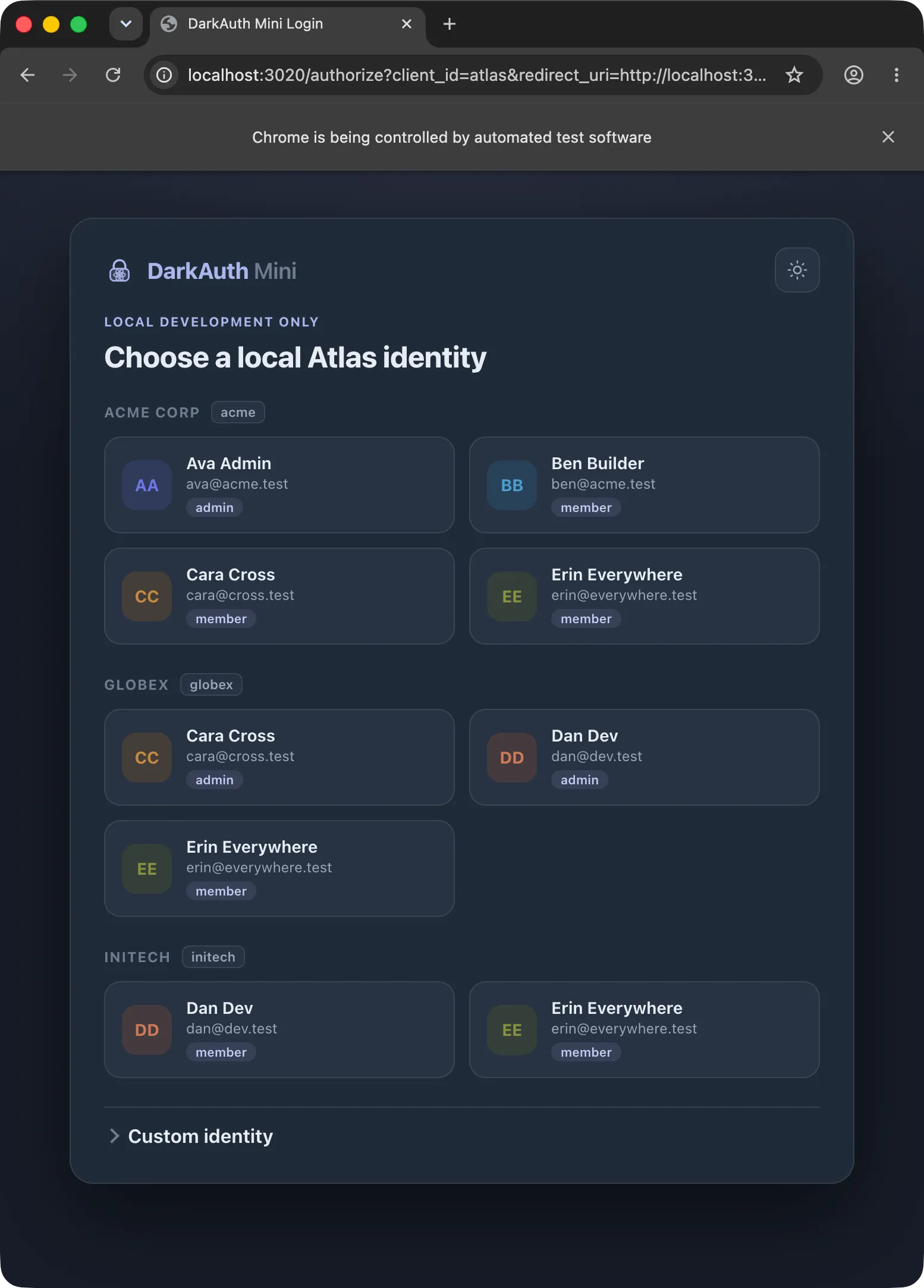
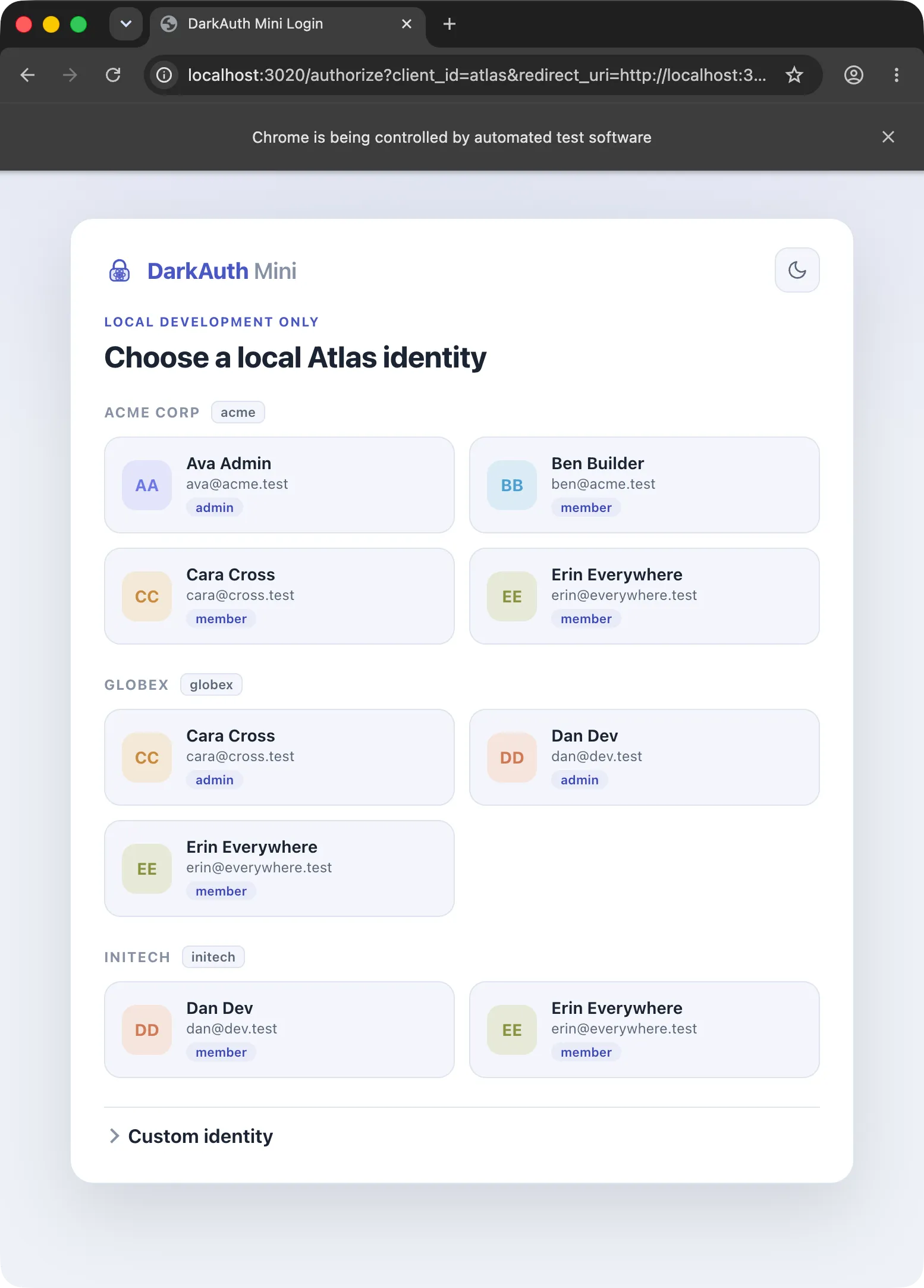
Grouping by organisation matters because a lot of the bugs worth catching in development are multi-tenant bugs. Cara appears under both Acme and Globex because she’s a member of both. Clicking her card under Acme logs you in with Acme as the active organisation, and the token carries the roles and permissions she has there. Switching to a read-only member in a different org is a different card, not a database edit.
If none of the presets fit what you’re testing, there’s a custom identity form underneath: type an email, a subject, pick an organisation, and tick the exact roles and permissions you want on the token. That covers the authorisation cases the presets don’t.
It’s all in one config file
Everything the Mini knows about lives in a darkauth-mini.yaml file that sits in your repo. There’s nothing app-specific baked into the Mini itself. The demo users, organisations, roles and permissions are all yours to define:
clients:
  - myapp

permissions:
  - myapp:login
  - myapp:admin

roles:
  admin:  [myapp:login, myapp:admin]
  member: [myapp:login]

organizations:
  - { id: acme,   slug: acme,   name: Acme Corp }
  - { id: globex, slug: globex, name: Globex }

users:
  - sub: ava
    email: ava@acme.test
    name: Ava Admin
    memberships:
      - { org: acme, roles: [admin] }
  - sub: cara
    email: cara@cross.test
    name: Cara Cross
    memberships:
      - { org: acme,   roles: [member] }
      - { org: globex, roles: [admin] }
That file is the whole configuration. It mirrors the model DarkAuth uses: organisations, roles that bundle permissions, and users whose memberships tie them to an organisation with a set of roles. When you sign in as a user, the Mini works out their effective permissions as the union of the permissions granted by their roles, then signs a token whose claims (org_id, org_slug, roles, permissions, and the full list of organisations the user belongs to) match what the real server would emit. Because the shape is the same, the auth code you’re exercising is the code that runs in production, not a dev-only branch.
Since the config lives in the repo and the Mini generates its own signing key on first run, a teammate who clones the project gets the same demo identities you have, with no setup.
What it deliberately isn’t
The Mini signs development JWTs without asking for a password. That is useful locally and dangerous anywhere else. DarkAuth Mini is not a security boundary and does not authenticate anyone. Anybody who can reach it can mint a token for any identity in the config. It belongs in your compose file behind localhost, and nowhere near a deployed environment.
What you get back is a checkout that runs on its own. Nothing hosted to be up, no account to create, no secret to share. Clone, docker compose up, click a user, start building.
Availability
DarkAuth Mini isn’t out yet. I’ve been building it alongside a project of mine that authenticates through DarkAuth, and I’m still tidying it up to stand on its own. It’ll be out soon. The aim is that adding it to a project is a few lines in a compose file and a config file you write once.
If you care about “clone and it just runs”, auth is usually the part that breaks it. This is how I stopped it breaking mine.